
Tenda router is a networking device that connects your devices like laptops, computers, phones and TVs to the Internet, then creates a wireless network in your home. It perfectly manages traffic, security and connectivity between ISP and your device. It helps you to provide a strong Internet connection and protect your device from every issue. It works easily on every device. You just need a Web browser on your device to access the web interface of the router.
What is a Tenda Router?
The Tenda Router is more popular for home and small office use because it is easy set-up, affordable and user-friendly. You can use it easily at your home and other places. It provides you with a stable network and is very easy to use. It provides you with full security and wireless connectivity with multiple devices. It has full security settings to protect your network. Tenda router distributes Internet access from your modem to all of your connected devices.
Default logins for Tenda
| IP Address: | 192.168.2.1 |
| Username: | admin |
| Password: | admin |
| IP Address: | 192.168.2.1 |
| Username: | admin |
| Password: | – |
| IP Address: | 192.168.0.1 |
| Username: | (none) |
| Password: | (none) |
Tenda Router Login Steps
Follow some simple steps to log in to your tenda router.
Connect to the Router
Firstly, you have to connect your devices like laptops, computers or PCs to the Tenda Wi-Fi network or a LAN cable. You can easily connect it with the help of a LAN cable. You need to fill in the details like your username or password. And the best thing is that you never need a password to connect with a LAN cable.
If you are not connected to the network, you won’t be able to access the Tenda login. If you want to access your router from a remote location, you can make use of a VPN.
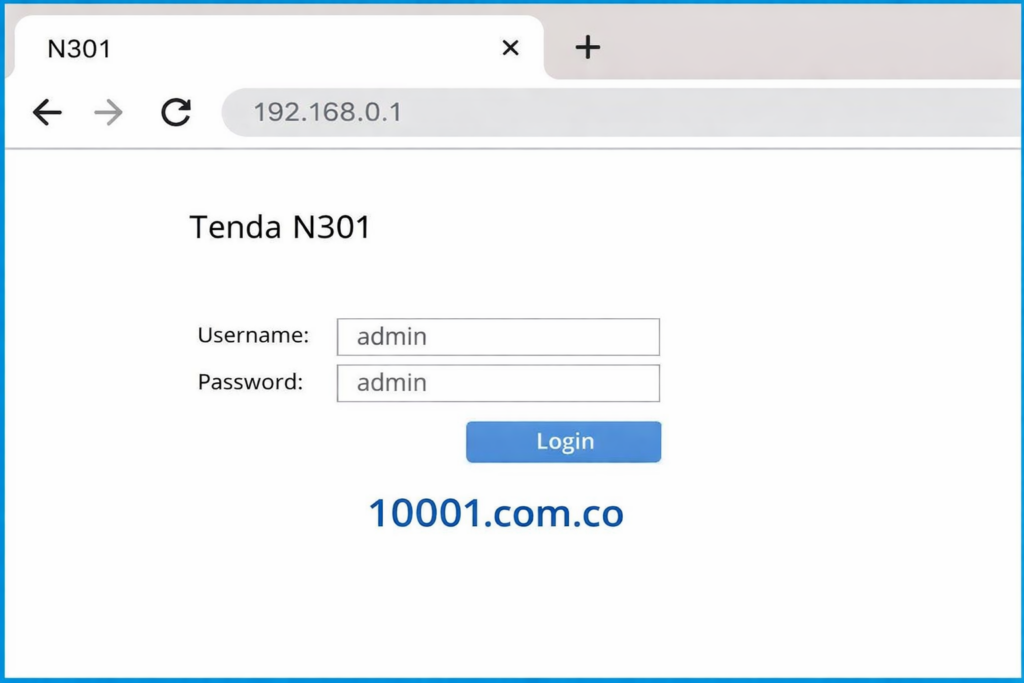
Open the web browser and enter 192.168.0.1
After connecting it with the network, you need to access the Tenda login IP. Every router has their own IP address, and it supports them differently. You can access your Tenda Wi-Fi login interface through 192.168.0.1. If it does not work and creates some issues, you have to try 192.168.2.1 and press enter. It provides you with a proper link like http://192.168.0.1. if you.
Forget the IP address of your router, you can easily find out through the command line in the connection settings. Its method is very easy. You just have to open the web browser and then enter the default IP address. It will take you to the correct page.
Enter Login Credentials
Sometimes you don’t need to connect the password and username to log in to your Tenda router. You don’t want to enter the password or any username, you just have to submit it. If it can’t work, then you have to enter your username and password.
Username: admin
Password: admin
If it’s not working, you have to reset your password and username by pressing the reset button. Then it will set your router settings and you can change your password and username. When you log on to the router with the default username and password. You can change it, and it will increase your security and protect your network.
Changes the Settings of Your Tenda Router
When you log on you can easily change any settings of your router according to your own. It helps you when you want to log in to your router next time. Save all the information on your device which you change. You can change some settings, like.
- You can set up an IP for your router.
- Change the name of your Wi-Fi.
- Set your own password.
- Update your password and save it on your phone.
- Set up a firewall.
You can set and change every setting according to your own. But be careful about setting your one wrong move to destroy your router, and it may stop working with one wrong move.
Troubleshooting Tenda Router
Sometimes there is a problem with your router and it may stop working. When you change the settings of your router it causes problems. You can easily set these if you noted the values before making any changes to the settings. You have to check which problem is stopping your router.
- Check the connection of your router.
- Check that all cables are connected securely.
- Turn off your router and restart it in a few seconds.
- These simple steps fix many problems.
- Check the connection of your Wi-Fi and stabilize it.
- Open a browser and enter the correct IP address 192.168.0.1.
- Enter the username and password and login.
Set all the problems and restart your router. It may work properly and provides you with full protection on your device.
FAQ’S
What is the main username and password for Tenda Router?
Most Tenda Routers do not require any password or username. But the default password and username are usually admin.
How do I log in to my Tenda Router?
Open a Web browser and enter 192.168.0.1 in the address bar and enter your login information.
What should I do if I can’t remember my Tenda Router password?
If you forget your password, find the reset button and press it in 10–30 seconds. Then this will restore factory settings.
How can I change my Wi-Fi password and name?
It’s very easy to change your Wi-Fi and password. Log in to the router settings and go to the wireless settings and change your name, update your password and save it on your device.
Why is my Wi-Fi slow on the Tenda router?
Sometimes it slows down because it is connected to many devices. It may slow down because of weak signals.
Final Words
Tenda Router is basically a network device which provides networks in homes, small offices and other places. You can easily use it for your stable connection. You can log in from the web browser with the help of IP address 192.168.0.1. You can also log in by using your username and password. Sometimes it causes problems and your router can’t work properly. You have to reset it with the help of the reset button. When you use it you will be satisfied by it.